

If you ever need help setting up and configuring a backup Internet connection, our specialists will be happy to provide you with these SERVICES!
Today’s Internet is used for more than just browsing websites and social media. Video surveillance, security systems, remote work, online point-of-sale systems, IP telephony, VPNs, servers, smart home systems, and many other services all depend on a stable connection.
Therefore, an outage with your primary internet service provider—even for just a few minutes—can be a serious problem.
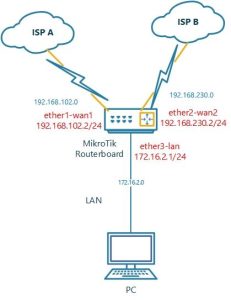
One of the most effective solutions is a backup internet connection with automatic failover. In such a system, two or more sources of internet access are used simultaneously: for example, a primary fiber-optic provider and a backup LTE, Starlink, or a second wired provider.
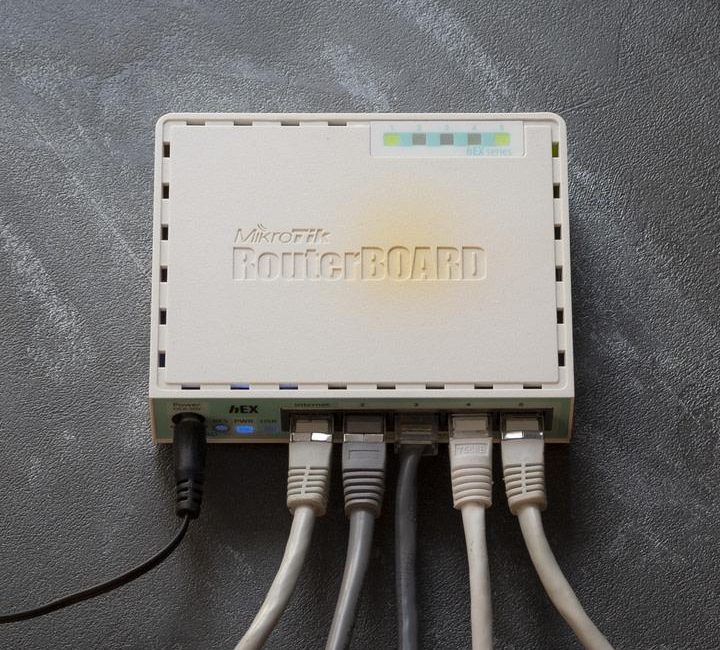
MikroTik is a convenient choice for a central device. RouterOS allows you to configure multiple WAN connections, monitor Internet availability, and automatically switch traffic to a backup connection in the event of a failure.
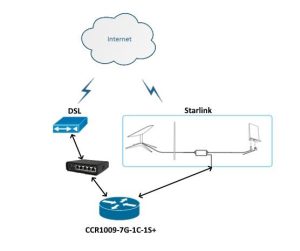
Why do you need a backup internet connection?
The simplest homemade circuit looks like this:
Internet service provider → Wi-Fi router → devices in the apartment or house.
If the internet service provider goes down, all devices lose their internet connection.
If a backup channel is available, the circuit changes as follows:
Primary Internet + Backup Internet → MikroTik → Local Network → Devices.
For example:
- WAN1 — fiber-optic Internet;
- WAN2 — LTE/4G;
- WAN3 — Starlink.
MikroTik constantly monitors the status of connections. As long as the primary channel is working, it is the one used. If the Internet becomes unavailable, the router switches traffic to the backup channel.
Once the primary connection is restored, MikroTik can automatically redirect traffic back to it.
That’s what automatic failover is.
Which backup internet service should I choose?
Virtually any connection capable of providing MikroTik with Internet access can be used as a backup connection.
Second Wired Internet Service Provider
One of the simplest options.
For example:
- WAN1 — the primary fiber-optic provider;
- WAN2 is another Ethernet/GPON provider.
The advantage of this approach is its high speed and the fact that it does not rely on a mobile network.
For an apartment, this could be:
Primary GPON + secondary provider.
For businesses:
Primary dedicated line + independent provider.
It is preferable for the two providers to use different physical lines. If both cables enter the building via the same route, a failure in that section of the infrastructure could simultaneously take both connections offline.
LTE as a Backup Internet Connection
LTE/4G is one of the most popular backup connectivity options.
To implement this, you can use:
- LTE modem;
- USB LTE modem;
- LTE router with Ethernet;
- MikroTik with an integrated LTE modem.
A typical diagram:
Primary Provider → WAN1 MikroTik
LTE → MikroTik WAN2
Under normal conditions, all traffic goes through the primary provider.
If the Internet connection is lost, MikroTik switches to LTE.
The main advantage of LTE is that it doesn’t rely on a wired connection. If a cable provider experiences an outage, the mobile network continues to function.
However, LTE depends on:
- the operator’s coverage;
- base station load;
- signal level;
- available frequency range;
- traffic limit based on the rate plan.
Therefore, it is advisable for businesses to check the actual speed and stability of LTE at a specific location in advance.
Starlink as a backup internet connection
Starlink can be used as another independent communication channel.
This option is particularly interesting for:
- private homes;
- suburban properties;
- production facilities;
- offices;
- stores;
- video surveillance sites;
- places where there is no stable wired Internet connection.
The diagram might look like this:
Internet Service Provider → MikroTik WAN1
Starlink → MikroTik WAN2
In the event of an outage with the primary provider, MikroTik automatically routes traffic to Starlink.
Starlink officially supports the use of a third-party router. Depending on the kit and generation of equipment, the connection can be made via Ethernet or an Ethernet adapter; for some configurations, Bypass Mode is used, which disables the Starlink router’s functions and allows routing to be handled by a third-party device.
This is especially convenient with MikroTik, since all network functions—NAT, DHCP, VLAN, VPN, firewall, and WAN switching—are handled by a single router.
Why is MikroTik a good choice for a backup internet connection?
A typical home router is usually designed to support a single WAN connection.
MikroTik allows you to build a much more flexible system.
For example:
WAN1 — Primary Provider
WAN2 — Starlink
WAN3 — LTE
LAN — a home or corporate network
RouterOS also allows you to configure:
- automatic WAN switching;
- channel priority;
- reserving multiple channels;
- checking Internet connectivity;
- load balancing;
- VLAN;
- VPN;
- firewall;
- separate routes for different devices;
- connection monitoring;
- Automatic return to the main channel.
The MikroTik documentation describes failover across multiple routes with different distance, and—for more reliable availability monitoring—recursive routing with remote IP address checks.
How MikroTik’s Automatic Switching Works
Let’s assume there are two connections:
WAN1 — Primary Internet Connection
WAN2 — LTE
Two default routes are created on MikroTik.
The main route has a higher priority:
0.0.0.0/0 → WAN1 → distance 1
0.0.0.0/0 → WAN2 → distance 2
As long as WAN1 is available, the first route is used.
If MikroTik determines that the primary link is unavailable, the WAN1 route becomes inactive.
After that, WAN2 begins to be used.
When WAN1 becomes available again, the primary route is activated, and traffic is redirected to it.
In simple terms:
┌── Primary Provider
│
│ WAN1
┌────▼─────┐
│ │
│ MikroTik │──── LAN / Wi-Fi
│ │
└────▲──────┘
│ WAN2
│
└── LTE / Starlink
Why isn’t it enough to just check the cable?
This is one of the key points to consider when configuring failover.
Let’s imagine the following situation:
MikroTik → ISP cable → ISP equipment
The physical Ethernet interface may remain active even if the Internet connection through it is not actually working.
For example:
- The provider’s equipment froze;
- There is no Internet connection;
- An upstream failure has occurred;
- DNS is not working properly;
- There is a physical connection, but there is no access to external resources.
Therefore, to ensure high-quality failover, it is advisable to check not only the status of the interface but also the actual availability of the external node.
MikroTik RouterOS supports check-gateway, and for more reliable configurations, you can use recursive routing and check multiple external IP addresses.
Verification via several external servers
For a large-scale network, it is not advisable to base the redundancy strategy on a single IP address.
For example, you can monitor several independent addresses:
8.8.8.8
1.1.1.1
208.67.222.222
If one of the servers is temporarily unresponsive, that doesn’t necessarily mean there’s a problem with your Internet connection.
Therefore, using multiple control points makes the transition smoother.
This is especially important for Starlink: Starlink itself recommends performing a health check via a public IP address rather than a DNS server, since Starlink’s DNS servers may not respond to pings. As examples, Starlink lists 8.8.8.8 and 1.1.1.1.
MikroTik + Starlink + LTE: Three Independent Connections
For a private home or small business, you can build an even more reliable system.
For example:
                   ┌── WAN1 ── Основной провайдер
                   │
                   ├── WAN2 ── Starlink
             ┌─────┤
             │MikroTik│
             └─────┤
                   │
                   └── WAN3 ── LTE
                         │
                         ▼
                  LAN / Wi-Fi / VPN
The priorities could be as follows:
1. Basic Wired Internet
2. Starlink
3. LTE
Under normal circumstances, the first channel is used.
If the primary provider goes down, MikroTik switches to Starlink.
If Starlink becomes unavailable at the same time, LTE is used.
Once the primary channel is restored, the router reverts to its original configuration.
This approach allows for multiple levels of redundancy.
Backup Internet for an Apartment
Two connections are usually sufficient for an apartment.
Option 1 — Two Wired Internet Providers
Провайдер №1 ── WAN1
                  │
              MikroTik
                  │
Провайдер №2 ── WAN2
                  │
                LAN
This is a good option if there are two independent internet service providers available in your home.
Option 2 — Wired Internet + LTE
Оптоволокно ── WAN1
                 │
             MikroTik
                 │
LTE ─────────── WAN2
                 │
              Wi-Fi/LAN
This option is especially convenient if the mobile network continues to work when the wired Internet is down.
Option 3 — Wired Internet + Starlink
Suitable for a single-family home where it is possible to install Starlink with a clear view of the sky.
Backup Internet for a Private Home
For a single-family home, the requirements are usually more stringent.
In addition to the Internet, the following must be kept operational:
- CCTV cameras;
- alarm systems;
- smart home;
- remote access;
- VPN;
- heating;
- IoT devices;
- access control systems.
Therefore, you can use:
Primary provider + Starlink + LTE.
MikroTik becomes the central router, and all devices remain on the same local network.
The switch occurs automatically, without the need to manually change Wi-Fi settings or plug in cables.
Backup Internet for Businesses
For businesses, an internet outage can lead not just to inconvenience, but to financial losses.
This applies in particular to:
- stores;
- restaurants;
- offices;
- warehouses;
- manufacturing facilities;
- video surveillance systems;
- IP telephony;
- VPN between branch offices;
- remote workstations;
- servers and cloud services.
In this case, it makes sense to use at least two independent WANs.
For example:
              ┌── ISP 1 — оптика
              │
              ├── ISP 2 — второй провайдер
              │
          MikroTik
              │
              ├── VLAN Office
              ├── VLAN Guest
              ├── VLAN CCTV
              ├── VLAN VoIP
              └── Servers
At the same time, MikroTik can determine which channel to use and apply different routing rules for different types of traffic.
Failover or load balancing?
It is important to distinguish between these two modes.
Failover
The main channel is in constant use.
The backup system is activated only in the event of a failure.
For example:
ISP1 → primary
LTE → Standby
This is the easiest option for home and small office use.
Load Balancing
Several Internet channels are used simultaneously.
For example:
ISP1 + ISP2 + LTE
Traffic is distributed among the connections.
RouterOS supports various load-balancing options, including PCC (Per Connection Classifier). However, for a typical network, it is important to distribute connections rather than individual packets within a single TCP session.
Load balancing allows for more efficient use of multiple channels, but the configuration is significantly more complex.
For a standard backup Internet connection, failover is often a simpler architecture.
Important note: A backup Internet connection doesn’t always mean a seamless switchover
When switching between Internet service providers, the external IP address changes.
Therefore, some connections may be broken.
For example:
- VPN session;
- video call;
- SSH;
- an active TCP connection;
- remote desktop.
In this case, new connections will be able to operate via a backup channel.
Therefore, it is more accurate to speak not of “zero downtime,” but of the automatic restoration of Internet access without user intervention.
Which MikroTik should I choose?
The specific model depends on the number of devices, internet speed, the number of WAN connections, and whether Wi-Fi, VPN, VLAN, and other features are required.
For an apartment or a small house, you might want to consider compact MikroTik models with several Ethernet ports.
For more complex networks—devices with a larger number of ports and higher performance.
If Wi-Fi needs to be set up separately, it often makes sense to use a MikroTik as the router and implement the Wi-Fi using separate access points.
This approach is particularly convenient for a large home or business.
How to Set Up a Backup System Correctly
When designing a system, it is recommended to consider not only the number of providers but also the independence of the infrastructure.
For example:
Bad option:
ISP1 ─┐
      ├── один ввод в здание
ISP2 ─┘
If the shared cable is damaged, service from both providers could be interrupted at the same time.
The best option:
ISP1 ───────────────┐
                    │
                 MikroTik
                    │
ISP2 ───────────────┘

Starlink ───────────┘
Various access technologies are used here.
That is precisely why the combination of fiber optics, LTE, and Starlink can provide a higher level of independence than simply having two connections of the same type.
What Else Is Important to Consider
1. Backup Power Supply
If the power goes out, even three internet service providers won’t help.
Therefore, it is recommended to connect MikroTik, LTE equipment, optical terminals, and network equipment to:
- UPS;
- battery system;
- DC-UPS;
- inverter.
Starlink must also be equipped with a backup power supply.
2. Monitoring
For businesses, it is advisable to monitor:
- the status of each WAN;
- speed;
- delay;
- packet loss;
- switching time;
- return of the main channel;
- loading the backup channel.
3. Separate VLANs
A corporate network can be divided into:
- employees;
- guests;
- cameras;
- telephony;
- servers;
- IoT.
MikroTik allows you to combine failover with VLANs and routing policies.
4. VPN
If remote access is used, you must take into account the change in the external IP address when switching.
In some configurations, it is more convenient to use a VPN with dynamic DNS, WireGuard, or a centralized VPN server.
An Example of an Optimal Layout for a Home
For a modern single-family home, I would consider the following architectural style:
                 Интернет
                    │
       ┌────────────┼────────────┐
       │            │            │
     ISP         Starlink       LTE
       │            │            │
       ▼            ▼            ▼
      WAN1         WAN2         WAN3
              ┌─────────────┐
              │   MikroTik  │
              └──────┬──────┘
                     │
              ┌──────┴──────┐
              │             │
            LAN          Wi-Fi AP
              │
       ┌──────┼─────────┐
       │      │         │
      TV    камеры    Smart Home
Priority:
ISP → Starlink → LTE
MikroTik monitors channel availability and automatically selects an available route.
Sample Business Plan
For an office, you can use a more complex architecture:
ISP 1 ───────┐
             │
ISP 2 ───────┤
             │
Starlink ────┤
             ▼
          MikroTik
             │
     ┌───────┼────────┐
     │       │        │
   Office   CCTV    Guest
    VLAN     VLAN    VLAN
     │       │        │
  ПК/VoIP   Камеры   Wi-Fi
In such a system, MikroTik serves as a single point of control for the entire network infrastructure.
Conclusion
MikroTik is one of the most convenient options for setting up automatic Internet connection failover.
You can use it to combine:
- basic wired Internet;
- a second provider;
- LTE/4G;
- Starlink;
- multiple WANs;
- VLAN;
- VPN;
- firewall;
- monitoring;
- automatic failover.
For an apartment, a ” main provider + LTE” plan is usually sufficient.
For a private home, you can use fiber-optic internet + LTE or Starlink.
For businesses, it makes sense to consider two independent wired providers plus Starlink or LTE.
The main advantage of this architecture is that the user does not need to manually switch between devices. MikroTik automatically monitors the status of the channels and, if necessary, switches the network to a backup connection. RouterOS supports both simple failover schemes based on route priority and more advanced options involving recursive routing and control of multiple external nodes.
If you’re using Starlink, you can also integrate it into this setup via Ethernet, and in supported configurations, you can use Bypass Mode and offload routing functions to MikroTik.
The result is a fully-fledged backup Internet system capable of automatically recovering from the failure of one or even several communication channels.